Snap the handwritten list. Cut from it in minutes.
Instacut turns a photo of a messy cutting list into checked parts, sheet layouts and a printable cutting list.
PROPRIETARY HANDWRITTEN SCANNING
THE SCAN
A photo of the list is enough to start cutting
Handwriting, retyping, misread edges and last-minute changes stay on one job.
Photo and PDF scan
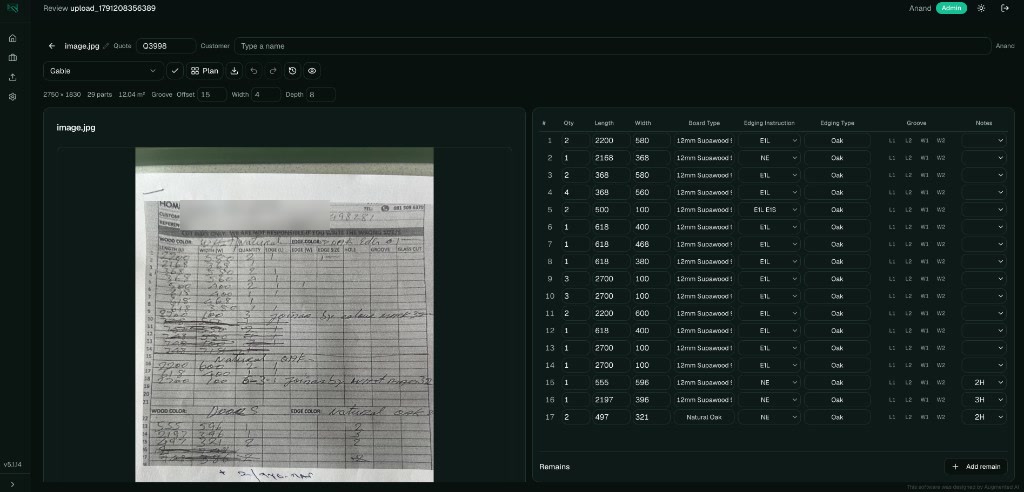
The list arrives as a photo or a scan. Instacut reads it.
Review against the photo
The original stays beside the lines, so nothing is guessed in the dark.
Edges, grooves and doors
Edge codes, grooves and door marks stay on the part.
Board and edge catalogs
Match parts to the boards and edges your shop already stocks.
FEATURES
From a messy list to parts you can cut
Photo scan
Active
Line read
Active
Edge check
Inactive
Sheet layout
Inactive
PDF export
Inactive
Check every line against the photo
Photograph the handwritten list, or drop in a PDF.
Instacut turns each line into length, width, quantity, board and edge.
Check the parts against the photo. Edit anything that looks off.
Change a run of lines, then step back if you need to.
Sheets, offcuts and edging
The optimiser shows yield, leftover sheets and edging length.
Nest the parts, see the sheets, offcuts and edging.
One wrong edge code wastes a whole sheet.
Print a PDF cutting list or download CSV for the shop.
PLANNED
TESTING
RELEASED
Core Dashboard v3
Execution retries
Performance metrics
Release Bento
248
+14%
System throughput
Ingest
Process
Execute
Recover
Ready for the saw
A printable cutting list, or a spreadsheet the office can open.
Phone on the floor, desktop in the office. Nothing to install.
Each list stays with the customer it belongs to.
Three extra shelves, and the list does not have to be rebuilt from scratch.
HOW IT WORKS
From the photo to a cutting list


INTEGRATING…
STEP 1
Snap the list
Photograph the handwritten list, or drop in a PDF.
Photo
Lines reading
Edges
Kept on the part
Review
Beside the photo
Export
PDF or CSV
Shop
Nothing to install
STEP 2
Read every line
Instacut turns each line into length, width, quantity, board and edge.
Any device
128
Parts ready
STEP 3
Review, then cut
Check the parts against the photo, then print the list.
BEHIND THE SCENES
The decisions that keep Instacut reliable
Developer Experience
Layout Stability
Production Ready
import { useEffect, useState } from "react";

export function FeatureFlag() {
  const [enabled, setEnabled
Production-first behavior, without compromises
Every component is built with predictable, production-first behavior in mind. The structure stays clean and readable as projects grow, without relying on visual tricks or artificial demo states. What you see is what actually ships.
WHY SHOPS SWITCH
Desktop cutters start after the typing.
Instacut starts at the photo.
Retyping
Someone retypes every part.
One Windows PC in the office.
The typed list is trusted as-is.
Layouts live in a separate program.
The saw waits on the typing.

Instacut
A photo of the handwritten list is enough.
Any browser, on the floor or at the desk.
Every line is checked against the photo.
Nesting, edging and the PDF stay on the same job.
Each shop's jobs stay separate.
PRICING
Simple plans,
built for every shop
MONTHLY
YEARLY
20% OFF
Starter
50 cut lists a month
R690
R690
/month
Photo and PDF scanning
Review beside the photo
PDF cutting lists and CSV
1 user
50 cut lists a month
Email support
Pro
POPULAR
300 cut lists a month
R1490
R1490
/month
Everything in Starter, plus:
Built-in optimiser
Everything in Starter
Board and edge catalogs
Up to 3 users
Priority support
Business
1,000 cut lists a month
R5500
R5500
/month
Everything in Pro, plus:
Unlimited users
Customers and job history
Bulk edits with undo
Priority WhatsApp support
Hands-on onboarding
Secure Payment Processing
Instant Access After Purchase
Cancel Anytime, Hassle-Free
Lifetime Product Updates
TESTIMONIALS
Trusted by developers
“We snap the handwritten list and the parts are on screen before anyone retypes a line.”

SARAH LEWIS
BACKEND DEVELOPER
“The photo stays beside the parts, so a bad edge code gets caught before the saw starts.”

JAMES PARKER
PRODUCT ENGINEER
“Sheet layouts, offcuts and the printable list stay on the same job.”

ANIKA REDDY
SOFTWARE DEVELOPER
“It saved the morning we used to spend typing sizes into the cutter.”

DAVID KIM
TECH LEAD
“The floor uses a phone. The office finishes the same list on a desktop.”

LAURA MARTINEZ
ENGINEERING MANAGER
“Nothing to install. The list opens in the browser and goes out as a PDF or CSV.”

OMAR ALI
FULL-STACK DEVELOPER
TRUSTED BY TEAMS WORLDWIDE
FAQS
Got questions?
We’ve got answers.
Here’s everything you need to know before getting started.
Still have questions?
Contact us and we’ll help you out.
How accurate is the scan?
Neat lists come through almost line for line. Rushed handwriting, crossed-out rows and shorthand still read well, and the original photo sits beside every part so your team confirms it before anything is cut.
What can I upload?
A phone photo or a scanned PDF of the cutting list. You can also add or fix lines by hand in the review screen.
Does it work on my phone?
Yes. Instacut runs in the browser on phones, tablets and desktops. Snap the list on the counter and finish it at the office PC.
Do I need to change how my saw works?
No. You get a printable PDF cutting list and a CSV. Use the built-in optimiser for sheet layouts, or keep your current process.
What counts as a cut list?
One uploaded customer list is one cut list, however many parts are on it. Your monthly allowance resets every month.
Is our data private?
Each shop's jobs, customers and catalogs are kept separate, and only the users you add can see them.
How do we get started?
Book a demo. Bring one of your own handwritten lists, we scan it live, then set up your boards, edging and house rules.
Can I fix a line by hand?
Yes. The review screen keeps the photo beside the parts, and you can edit any line before the list is cut.